import pandas as pd
import numpy as np
from plotnine import *데이터 시각화 실습 : FIFA23 선수 데이터
plotnine
FIFA23 선수 데이터에서 결측치를 처리하고 여러 열을 가공하여 시각화해보자!
해당 포스트는 전북대학교 통계학과 최규빈 교수님의 강의내용을 토대로 재구성되었음을 알립니다.
1. 라이브러리 import
2. 학습할 코드
A. dropna()
- 행에서 결측치가 하나라도 있으면 제거한다.
df = pd.DataFrame({
    'A': [1,2,3,np.nan,5,6,7],
    'B': [11,np.nan,33,np.nan,55,66,77],
    'C': [111,222,333,np.nan,555,666,np.nan]})
df| A | B | C | |
|---|---|---|---|
| 0 | 1.0 | 11.0 | 111.0 |
| 1 | 2.0 | NaN | 222.0 |
| 2 | 3.0 | 33.0 | 333.0 |
| 3 | NaN | NaN | NaN |
| 4 | 5.0 | 55.0 | 555.0 |
| 5 | 6.0 | 66.0 | 666.0 |
| 6 | 7.0 | 77.0 | NaN |
이러한 데이터가 있다고 할 때…
df.dropna()| A | B | C | |
|---|---|---|---|
| 0 | 1.0 | 11.0 | 111.0 |
| 2 | 3.0 | 33.0 | 333.0 |
| 4 | 5.0 | 55.0 | 555.0 |
| 5 | 6.0 | 66.0 | 666.0 |
결측치가 하나라도 있는 행은 모두 드롭된다. (원본 데이터 손상 X)
### B. _
- 파이썬에서 가장 최근 콘솔에 띄워진 결과는 _로 불러올 수 있다.
a = [1,2,3]
a + [4]
[1, 2, 3, 4]_[1, 2, 3, 4]_ + [5][1, 2, 3, 4, 5]_.pop() ## 마지막 요소를 리턴하고 그 요소는 삭제5_ + 16리스트에서 숫자까지…
_의 다사다난한 모험
3. FIFA23 시각화 문제
df = pd.read_csv('https://raw.githubusercontent.com/guebin/DV2021/master/_notebooks/2021-10-25-FIFA22_official_data.csv')
df.head()| ID | Name | Age | Photo | Nationality | Flag | Overall | Potential | Club | Club Logo | ... | SlidingTackle | GKDiving | GKHandling | GKKicking | GKPositioning | GKReflexes | Best Position | Best Overall Rating | Release Clause | DefensiveAwareness | |
|---|---|---|---|---|---|---|---|---|---|---|---|---|---|---|---|---|---|---|---|---|---|
| 0 | 212198 | Bruno Fernandes | 26 | https://cdn.sofifa.com/players/212/198/22_60.png | Portugal | https://cdn.sofifa.com/flags/pt.png | 88 | 89 | Manchester United | https://cdn.sofifa.com/teams/11/30.png | ... | 65.0 | 12.0 | 14.0 | 15.0 | 8.0 | 14.0 | CAM | 88.0 | €206.9M | 72.0 |
| 1 | 209658 | L. Goretzka | 26 | https://cdn.sofifa.com/players/209/658/22_60.png | Germany | https://cdn.sofifa.com/flags/de.png | 87 | 88 | FC Bayern München | https://cdn.sofifa.com/teams/21/30.png | ... | 77.0 | 13.0 | 8.0 | 15.0 | 11.0 | 9.0 | CM | 87.0 | €160.4M | 74.0 |
| 2 | 176580 | L. Suárez | 34 | https://cdn.sofifa.com/players/176/580/22_60.png | Uruguay | https://cdn.sofifa.com/flags/uy.png | 88 | 88 | Atlético de Madrid | https://cdn.sofifa.com/teams/240/30.png | ... | 38.0 | 27.0 | 25.0 | 31.0 | 33.0 | 37.0 | ST | 88.0 | €91.2M | 42.0 |
| 3 | 192985 | K. De Bruyne | 30 | https://cdn.sofifa.com/players/192/985/22_60.png | Belgium | https://cdn.sofifa.com/flags/be.png | 91 | 91 | Manchester City | https://cdn.sofifa.com/teams/10/30.png | ... | 53.0 | 15.0 | 13.0 | 5.0 | 10.0 | 13.0 | CM | 91.0 | €232.2M | 68.0 |
| 4 | 224334 | M. Acuña | 29 | https://cdn.sofifa.com/players/224/334/22_60.png | Argentina | https://cdn.sofifa.com/flags/ar.png | 84 | 84 | Sevilla FC | https://cdn.sofifa.com/teams/481/30.png | ... | 82.0 | 8.0 | 14.0 | 13.0 | 13.0 | 14.0 | LB | 84.0 | €77.7M | 80.0 |
5 rows × 65 columns
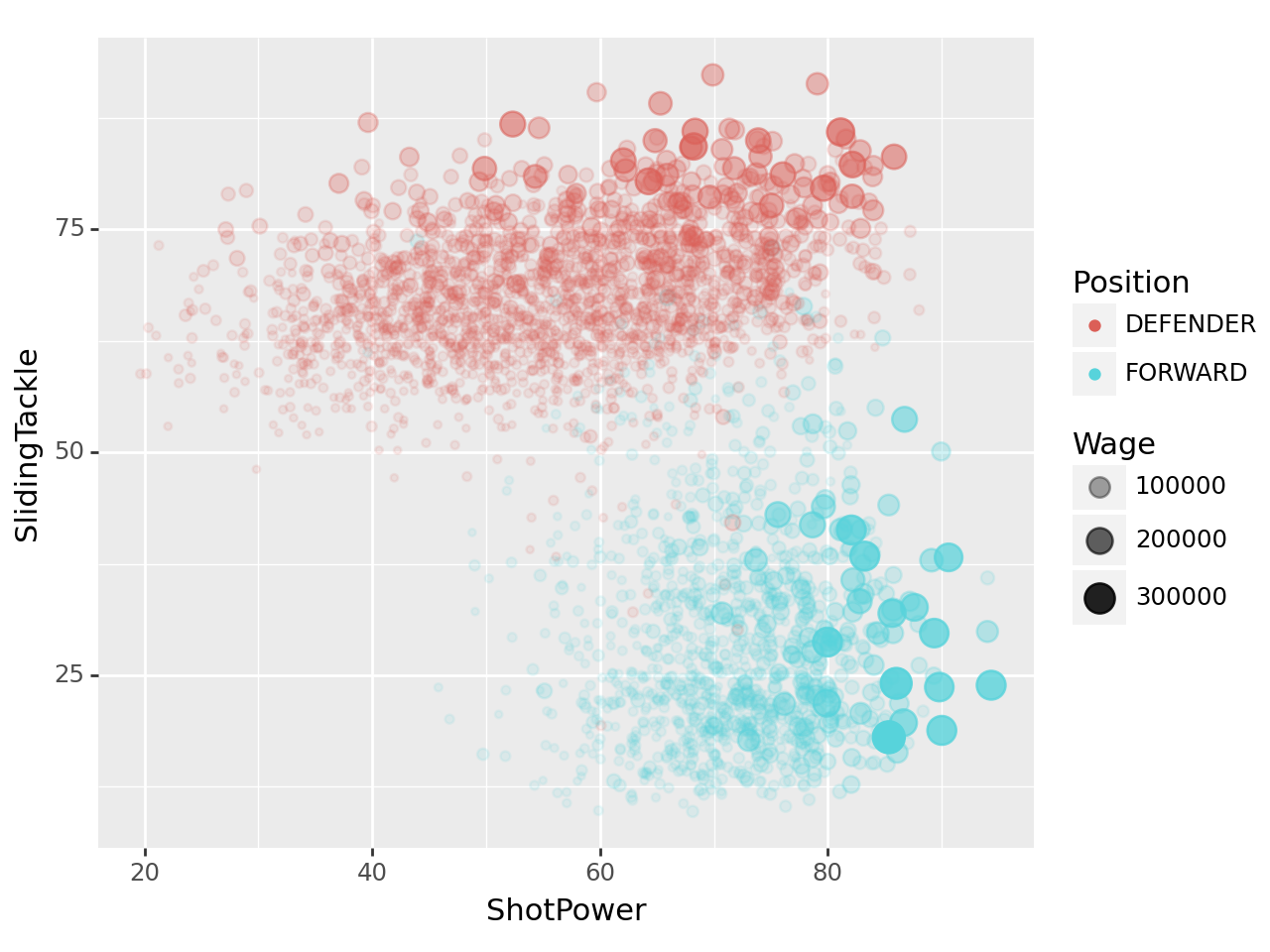
포지션별로 선수들의 능력치(ShotPower,SlidingTackle)와 급여(Wage)를 시각화하고 싶다. 아래의 세부지침에 맞추어 포지션별 ShotPower와 SlidingTackle의 산점도를 그려라.
df.Position0 <span class="pos pos18">CAM
1 <span class="pos pos11">LDM
2 <span class="pos pos24">RS
3 <span class="pos pos13">RCM
4 <span class="pos pos7">LB
...
16705 <span class="pos pos29">RES
16706 <span class="pos pos29">RES
16707 <span class="pos pos29">RES
16708 <span class="pos pos28">SUB
16709 <span class="pos pos28">SUB
Name: Position, Length: 16710, dtype: object세부지침
A. Column의 이름에서 공백을 제거하라.
B. 결측치가 50%이상인 컬럼을 찾고 이를 제거하라. 그 뒤에 .dropna()를 사용하여 결측치가 포함된 행을 제거하라.
C. position_dict를 이용하여 df.Position을 적절하게 변환하라. 변환된 값을 df.Position에 저장하라.
position_dict = {
    'GOALKEEPER':{'GK'},
    'DEFENDER':{'CB','RCB','LCB','RB','LB','RWB','LWB'},
    'MIDFIELDER':{'CM','RCM','LCM','CDM','RDM','LDM','CAM','RAM','LAM','RM','LM'},
    'FORWARD':{'ST','CF','RF','LF','RW','LW','RS','LS'},
    'SUB':{'SUB'},
    'RES':{'RES'}
}D. df.Wage를 적절하게 변환하라.
E. Position==“DEFENDER” or Position==“FORWARD”에 해당하는 관측치를 고른 뒤 x축에 ShotPower, y축에 SlidingTackle을 시각화하라. 이때 Position은 color로 구분하고 Wage는 size와 alpha로 구분하라.
시각화 예시
4. FIFA23 시각화 - 풀이
A. Column의 이름에서 공백을 제거하라.
df.columnsIndex(['ID', 'Name', 'Age', 'Photo', 'Nationality', 'Flag', 'Overall',
'Potential', 'Club', 'Club Logo', 'Value', 'Wage', 'Special',
'Preferred Foot', 'International Reputation', 'Weak Foot',
'Skill Moves', 'Work Rate', 'Body Type', 'Real Face', 'Position',
'Jersey Number', 'Joined', 'Loaned From', 'Contract Valid Until',
'Height', 'Weight', 'Crossing', 'Finishing', 'HeadingAccuracy',
'ShortPassing', 'Volleys', 'Dribbling', 'Curve', 'FKAccuracy',
'LongPassing', 'BallControl', 'Acceleration', 'SprintSpeed', 'Agility',
'Reactions', 'Balance', 'ShotPower', 'Jumping', 'Stamina', 'Strength',
'LongShots', 'Aggression', 'Interceptions', 'Positioning', 'Vision',
'Penalties', 'Composure', 'Marking', 'StandingTackle', 'SlidingTackle',
'GKDiving', 'GKHandling', 'GKKicking', 'GKPositioning', 'GKReflexes',
'Best Position', 'Best Overall Rating', 'Release Clause',
'DefensiveAwareness'],
dtype='object')df.columns.str.replace(' ', '')Index(['ID', 'Name', 'Age', 'Photo', 'Nationality', 'Flag', 'Overall',
'Potential', 'Club', 'ClubLogo', 'Value', 'Wage', 'Special',
'PreferredFoot', 'InternationalReputation', 'WeakFoot', 'SkillMoves',
'WorkRate', 'BodyType', 'RealFace', 'Position', 'JerseyNumber',
'Joined', 'LoanedFrom', 'ContractValidUntil', 'Height', 'Weight',
'Crossing', 'Finishing', 'HeadingAccuracy', 'ShortPassing', 'Volleys',
'Dribbling', 'Curve', 'FKAccuracy', 'LongPassing', 'BallControl',
'Acceleration', 'SprintSpeed', 'Agility', 'Reactions', 'Balance',
'ShotPower', 'Jumping', 'Stamina', 'Strength', 'LongShots',
'Aggression', 'Interceptions', 'Positioning', 'Vision', 'Penalties',
'Composure', 'Marking', 'StandingTackle', 'SlidingTackle', 'GKDiving',
'GKHandling', 'GKKicking', 'GKPositioning', 'GKReflexes',
'BestPosition', 'BestOverallRating', 'ReleaseClause',
'DefensiveAwareness'],
dtype='object')df.set_axis(df.columns.str.replace(' ', ''), axis = 1).columnsIndex(['ID', 'Name', 'Age', 'Photo', 'Nationality', 'Flag', 'Overall',
'Potential', 'Club', 'ClubLogo', 'Value', 'Wage', 'Special',
'PreferredFoot', 'InternationalReputation', 'WeakFoot', 'SkillMoves',
'WorkRate', 'BodyType', 'RealFace', 'Position', 'JerseyNumber',
'Joined', 'LoanedFrom', 'ContractValidUntil', 'Height', 'Weight',
'Crossing', 'Finishing', 'HeadingAccuracy', 'ShortPassing', 'Volleys',
'Dribbling', 'Curve', 'FKAccuracy', 'LongPassing', 'BallControl',
'Acceleration', 'SprintSpeed', 'Agility', 'Reactions', 'Balance',
'ShotPower', 'Jumping', 'Stamina', 'Strength', 'LongShots',
'Aggression', 'Interceptions', 'Positioning', 'Vision', 'Penalties',
'Composure', 'Marking', 'StandingTackle', 'SlidingTackle', 'GKDiving',
'GKHandling', 'GKKicking', 'GKPositioning', 'GKReflexes',
'BestPosition', 'BestOverallRating', 'ReleaseClause',
'DefensiveAwareness'],
dtype='object')공백이 없어진 것을 확인할 수 있다.
B. 결측치가 50%이상인 컬럼을 찾고 이를 제거하라. 그 뒤에 .dropna()를 사용하여 결측치가 포함된 행을 제거하라.
df_b = df.set_axis(df.columns.str.replace(' ', ''), axis = 1)df_b.loc[:, df_b.isna().mean() >= 0.5].columnsIndex(['LoanedFrom', 'Marking'], dtype='object')위 두 개의 컬럼이 결측치가 50% 이상이다.
df_b.loc[:, df_b.isna().mean() < 0.5].dropna()
##df_b.loc[:, [s < 0.5 for s in df_b.isna().mean()]].dropna()| ID | Name | Age | Photo | Nationality | Flag | Overall | Potential | Club | ClubLogo | ... | SlidingTackle | GKDiving | GKHandling | GKKicking | GKPositioning | GKReflexes | BestPosition | BestOverallRating | ReleaseClause | DefensiveAwareness | |
|---|---|---|---|---|---|---|---|---|---|---|---|---|---|---|---|---|---|---|---|---|---|
| 0 | 212198 | Bruno Fernandes | 26 | https://cdn.sofifa.com/players/212/198/22_60.png | Portugal | https://cdn.sofifa.com/flags/pt.png | 88 | 89 | Manchester United | https://cdn.sofifa.com/teams/11/30.png | ... | 65.0 | 12.0 | 14.0 | 15.0 | 8.0 | 14.0 | CAM | 88.0 | €206.9M | 72.0 |
| 1 | 209658 | L. Goretzka | 26 | https://cdn.sofifa.com/players/209/658/22_60.png | Germany | https://cdn.sofifa.com/flags/de.png | 87 | 88 | FC Bayern München | https://cdn.sofifa.com/teams/21/30.png | ... | 77.0 | 13.0 | 8.0 | 15.0 | 11.0 | 9.0 | CM | 87.0 | €160.4M | 74.0 |
| 2 | 176580 | L. Suárez | 34 | https://cdn.sofifa.com/players/176/580/22_60.png | Uruguay | https://cdn.sofifa.com/flags/uy.png | 88 | 88 | Atlético de Madrid | https://cdn.sofifa.com/teams/240/30.png | ... | 38.0 | 27.0 | 25.0 | 31.0 | 33.0 | 37.0 | ST | 88.0 | €91.2M | 42.0 |
| 3 | 192985 | K. De Bruyne | 30 | https://cdn.sofifa.com/players/192/985/22_60.png | Belgium | https://cdn.sofifa.com/flags/be.png | 91 | 91 | Manchester City | https://cdn.sofifa.com/teams/10/30.png | ... | 53.0 | 15.0 | 13.0 | 5.0 | 10.0 | 13.0 | CM | 91.0 | €232.2M | 68.0 |
| 4 | 224334 | M. Acuña | 29 | https://cdn.sofifa.com/players/224/334/22_60.png | Argentina | https://cdn.sofifa.com/flags/ar.png | 84 | 84 | Sevilla FC | https://cdn.sofifa.com/teams/481/30.png | ... | 82.0 | 8.0 | 14.0 | 13.0 | 13.0 | 14.0 | LB | 84.0 | €77.7M | 80.0 |
| ... | ... | ... | ... | ... | ... | ... | ... | ... | ... | ... | ... | ... | ... | ... | ... | ... | ... | ... | ... | ... | ... |
| 16703 | 259718 | F. Gebhardt | 19 | https://cdn.sofifa.com/players/259/718/22_60.png | Germany | https://cdn.sofifa.com/flags/de.png | 52 | 66 | FC Basel 1893 | https://cdn.sofifa.com/teams/896/30.png | ... | 10.0 | 53.0 | 45.0 | 47.0 | 52.0 | 57.0 | GK | 52.0 | €361K | 6.0 |
| 16704 | 251433 | B. Voll | 20 | https://cdn.sofifa.com/players/251/433/22_60.png | Germany | https://cdn.sofifa.com/flags/de.png | 58 | 69 | F.C. Hansa Rostock | https://cdn.sofifa.com/teams/27/30.png | ... | 10.0 | 59.0 | 60.0 | 56.0 | 55.0 | 61.0 | GK | 58.0 | €656K | 5.0 |
| 16706 | 262846 | �. Dobre | 20 | https://cdn.sofifa.com/players/262/846/22_60.png | Romania | https://cdn.sofifa.com/flags/ro.png | 53 | 63 | FC Academica Clinceni | https://cdn.sofifa.com/teams/113391/30.png | ... | 12.0 | 57.0 | 52.0 | 53.0 | 48.0 | 58.0 | GK | 53.0 | €279K | 5.0 |
| 16707 | 241317 | 21 Xue Qinghao | 19 | https://cdn.sofifa.com/players/241/317/21_60.png | China PR | https://cdn.sofifa.com/flags/cn.png | 47 | 60 | Shanghai Shenhua FC | https://cdn.sofifa.com/teams/110955/30.png | ... | 9.0 | 49.0 | 48.0 | 45.0 | 38.0 | 52.0 | GK | 47.0 | €223K | 21.0 |
| 16708 | 259646 | A. Shaikh | 18 | https://cdn.sofifa.com/players/259/646/22_60.png | India | https://cdn.sofifa.com/flags/in.png | 47 | 67 | ATK Mohun Bagan FC | https://cdn.sofifa.com/teams/113146/30.png | ... | 13.0 | 49.0 | 41.0 | 39.0 | 45.0 | 49.0 | GK | 47.0 | €259K | 7.0 |
14398 rows × 63 columns
따라서 해당 조건에 반대를 슬라이싱하는 방식으로 해당 컬럼을 제거하였다.
### C. position_dict를 이용하여 df.Position을 적절하게 변환하라. 변환된 값을 df.Position에 저장하라.
position_dict{'GOALKEEPER': {'GK'},
'DEFENDER': {'CB', 'LB', 'LCB', 'LWB', 'RB', 'RCB', 'RWB'},
'MIDFIELDER': {'CAM',
'CDM',
'CM',
'LAM',
'LCM',
'LDM',
'LM',
'RAM',
'RCM',
'RDM',
'RM'},
'FORWARD': {'CF', 'LF', 'LS', 'LW', 'RF', 'RS', 'RW', 'ST'},
'SUB': {'SUB'},
'RES': {'RES'}}df_c = df_b.loc[:, df_b.isna().mean() < 0.5].dropna()
df_c.Position0 <span class="pos pos18">CAM
1 <span class="pos pos11">LDM
2 <span class="pos pos24">RS
3 <span class="pos pos13">RCM
4 <span class="pos pos7">LB
...
16703 <span class="pos pos29">RES
16704 <span class="pos pos29">RES
16706 <span class="pos pos29">RES
16707 <span class="pos pos29">RES
16708 <span class="pos pos28">SUB
Name: Position, Length: 14398, dtype: object뒤의
>를 제외한 문자열을 추출해서 바꿔줘야 할 것 같다.
df_c.assign(Position = df_c.Position.str.split('>').str[-1]).Position0 CAM
1 LDM
2 RS
3 RCM
4 LB
...
16703 RES
16704 RES
16706 RES
16707 RES
16708 SUB
Name: Position, Length: 14398, dtype: object뒤의 문자열만 추출
- 무지성으로 쥐어짜내본 아이디어
x = df_c.Position.str.split('>').str[-1][2]
lst = [i != 0 for i in [key if x in value else 0 for key, value in position_dict.items()]];lst
[False, False, False, True, False, False][i != 0 for i in [key if x in value else 0 for key, value in position_dict.items()]].index(True)3lst = [[key if i in value else np.nan if i == np.nan else 1 for key, value in position_dict.items()] for i in df_c.Position.str.split('>').str[-1]]
value와 같은 값이면key, 아니면1, 결측치면np.nan을 넣어줘봤음.
def cutting_1(lst):
    for i in lst:
        if i != 1:
            return i

Position_s = pd.Series(lst).apply(cutting_1); Position_s
0 MIDFIELDER
1 MIDFIELDER
2 FORWARD
3 MIDFIELDER
4 DEFENDER
...
14393 RES
14394 RES
14395 RES
14396 RES
14397 SUB
Length: 14398, dtype: object잘 된듯~(근데 앞에서 .dropna()를 안해서 쓸데없는 코드까지 작성해버렸다.)~
lst_2 = list(map(lambda x : [key for key, value in position_dict.items() if x in value], df_c.Position.str.split('>').str[-1]))
## [i[0] for i in lst_2] : 왜인지 안됨
## [i.pop() for i in lst_2] : 이건 뭐 객체 저장인지 뭔지 문제라는데, 다른 변수에 copy()해서 넣어봐도 안됨
df_c.reset_index(drop = True).assign(Position = Position_s).Position0 MIDFIELDER
1 MIDFIELDER
2 FORWARD
3 MIDFIELDER
4 DEFENDER
...
14393 RES
14394 RES
14395 RES
14396 RES
14397 SUB
Name: Position, Length: 14398, dtype: object- 잘못된 코드
df_c.assign(Position = Position_s).Position ## 문제가 있는 코드, reset_index(drop = True)를 안해줘서 인덱스가 꼬임0 MIDFIELDER
1 MIDFIELDER
2 FORWARD
3 MIDFIELDER
4 DEFENDER
...
16703 NaN
16704 NaN
16706 NaN
16707 NaN
16708 NaN
Name: Position, Length: 14398, dtype: object뭘 잘못했는 지 알겠지? index가 달라서 값이 엮이지가 않잖아…
- 매우 간단한 교수님의 해법
df.set_axis(df.columns.str.replace(' ',''),axis=1)\
.loc[:,lambda _df: _df.isna().mean()<0.5].dropna()\
.assign(Position = lambda _df: _df.Position.str.split(">").str[-1].apply(lambda x: [k for k,v in position_dict.items() if x in v].pop()))| ID | Name | Age | Photo | Nationality | Flag | Overall | Potential | Club | ClubLogo | ... | SlidingTackle | GKDiving | GKHandling | GKKicking | GKPositioning | GKReflexes | BestPosition | BestOverallRating | ReleaseClause | DefensiveAwareness | |
|---|---|---|---|---|---|---|---|---|---|---|---|---|---|---|---|---|---|---|---|---|---|
| 0 | 212198 | Bruno Fernandes | 26 | https://cdn.sofifa.com/players/212/198/22_60.png | Portugal | https://cdn.sofifa.com/flags/pt.png | 88 | 89 | Manchester United | https://cdn.sofifa.com/teams/11/30.png | ... | 65.0 | 12.0 | 14.0 | 15.0 | 8.0 | 14.0 | CAM | 88.0 | €206.9M | 72.0 |
| 1 | 209658 | L. Goretzka | 26 | https://cdn.sofifa.com/players/209/658/22_60.png | Germany | https://cdn.sofifa.com/flags/de.png | 87 | 88 | FC Bayern München | https://cdn.sofifa.com/teams/21/30.png | ... | 77.0 | 13.0 | 8.0 | 15.0 | 11.0 | 9.0 | CM | 87.0 | €160.4M | 74.0 |
| 2 | 176580 | L. Suárez | 34 | https://cdn.sofifa.com/players/176/580/22_60.png | Uruguay | https://cdn.sofifa.com/flags/uy.png | 88 | 88 | Atlético de Madrid | https://cdn.sofifa.com/teams/240/30.png | ... | 38.0 | 27.0 | 25.0 | 31.0 | 33.0 | 37.0 | ST | 88.0 | €91.2M | 42.0 |
| 3 | 192985 | K. De Bruyne | 30 | https://cdn.sofifa.com/players/192/985/22_60.png | Belgium | https://cdn.sofifa.com/flags/be.png | 91 | 91 | Manchester City | https://cdn.sofifa.com/teams/10/30.png | ... | 53.0 | 15.0 | 13.0 | 5.0 | 10.0 | 13.0 | CM | 91.0 | €232.2M | 68.0 |
| 4 | 224334 | M. Acuña | 29 | https://cdn.sofifa.com/players/224/334/22_60.png | Argentina | https://cdn.sofifa.com/flags/ar.png | 84 | 84 | Sevilla FC | https://cdn.sofifa.com/teams/481/30.png | ... | 82.0 | 8.0 | 14.0 | 13.0 | 13.0 | 14.0 | LB | 84.0 | €77.7M | 80.0 |
| ... | ... | ... | ... | ... | ... | ... | ... | ... | ... | ... | ... | ... | ... | ... | ... | ... | ... | ... | ... | ... | ... |
| 16703 | 259718 | F. Gebhardt | 19 | https://cdn.sofifa.com/players/259/718/22_60.png | Germany | https://cdn.sofifa.com/flags/de.png | 52 | 66 | FC Basel 1893 | https://cdn.sofifa.com/teams/896/30.png | ... | 10.0 | 53.0 | 45.0 | 47.0 | 52.0 | 57.0 | GK | 52.0 | €361K | 6.0 |
| 16704 | 251433 | B. Voll | 20 | https://cdn.sofifa.com/players/251/433/22_60.png | Germany | https://cdn.sofifa.com/flags/de.png | 58 | 69 | F.C. Hansa Rostock | https://cdn.sofifa.com/teams/27/30.png | ... | 10.0 | 59.0 | 60.0 | 56.0 | 55.0 | 61.0 | GK | 58.0 | €656K | 5.0 |
| 16706 | 262846 | �. Dobre | 20 | https://cdn.sofifa.com/players/262/846/22_60.png | Romania | https://cdn.sofifa.com/flags/ro.png | 53 | 63 | FC Academica Clinceni | https://cdn.sofifa.com/teams/113391/30.png | ... | 12.0 | 57.0 | 52.0 | 53.0 | 48.0 | 58.0 | GK | 53.0 | €279K | 5.0 |
| 16707 | 241317 | 21 Xue Qinghao | 19 | https://cdn.sofifa.com/players/241/317/21_60.png | China PR | https://cdn.sofifa.com/flags/cn.png | 47 | 60 | Shanghai Shenhua FC | https://cdn.sofifa.com/teams/110955/30.png | ... | 9.0 | 49.0 | 48.0 | 45.0 | 38.0 | 52.0 | GK | 47.0 | €223K | 21.0 |
| 16708 | 259646 | A. Shaikh | 18 | https://cdn.sofifa.com/players/259/646/22_60.png | India | https://cdn.sofifa.com/flags/in.png | 47 | 67 | ATK Mohun Bagan FC | https://cdn.sofifa.com/teams/113146/30.png | ... | 13.0 | 49.0 | 41.0 | 39.0 | 45.0 | 49.0 | GK | 47.0 | €259K | 7.0 |
14398 rows × 63 columns
아마도 모든 문제의 원흉은
dropna()를 하지 않은 너에게 있었다. (결측치가 있으면 작동이 힘든가봄)
D. df.Wage를 적절하게 변환하라.
df.Wage0 €250K
1 €140K
2 €135K
3 €350K
4 €45K
...
16705 €1K
16706 €550
16707 €700
16708 €500
16709 €0
Name: Wage, Length: 16710, dtype: object시각화 해주려면 숫자형 자료여야 하는데, 범주형으로 들어가있다.
- 앞의 유로를 없애고, K는 1000을 곱해주자.
df_d = df_c.reset_index(drop = True).assign(Position = Position_s)df_d.Wage.str.replace('€','').str.replace('K','000')
##[int(i) if i[-1] != 'K' else int(i.replace('K',''))*1000 for i in df_d.Wage.str.replace('€','')]와 동일0 250000
1 140000
2 135000
3 350000
4 45000
...
14393 650
14394 950
14395 550
14396 700
14397 500
Name: Wage, Length: 14398, dtype: objectdf_d.assign(Wage = df_d.Wage.str.replace('€','').str.replace('K','000').astype(int)).Wage0 250000
1 140000
2 135000
3 350000
4 45000
...
14393 650
14394 950
14395 550
14396 700
14397 500
Name: Wage, Length: 14398, dtype: int32잘 된 것을 볼 수 있다.
### E. Position==“DEFENDER” or Position==“FORWARD”에 해당하는 관측치를 고른 뒤 x축에 ShotPower, y축에 SlidingTackle을 시각화하라. 이때 Position은 color로 구분하고 Wage는 size와 alpha로 구분하라.
df_e = df_d.assign(Wage = df_d.Wage.str.replace('€','').str.replace('K','000').astype(int))df_e.loc[(df_e.Position == "DEFENDER") | (df_e.Position == "FORWARD")]| ID | Name | Age | Photo | Nationality | Flag | Overall | Potential | Club | ClubLogo | ... | SlidingTackle | GKDiving | GKHandling | GKKicking | GKPositioning | GKReflexes | BestPosition | BestOverallRating | ReleaseClause | DefensiveAwareness | |
|---|---|---|---|---|---|---|---|---|---|---|---|---|---|---|---|---|---|---|---|---|---|
| 2 | 176580 | L. Suárez | 34 | https://cdn.sofifa.com/players/176/580/22_60.png | Uruguay | https://cdn.sofifa.com/flags/uy.png | 88 | 88 | Atlético de Madrid | https://cdn.sofifa.com/teams/240/30.png | ... | 38.0 | 27.0 | 25.0 | 31.0 | 33.0 | 37.0 | ST | 88.0 | €91.2M | 42.0 |
| 4 | 224334 | M. Acuña | 29 | https://cdn.sofifa.com/players/224/334/22_60.png | Argentina | https://cdn.sofifa.com/flags/ar.png | 84 | 84 | Sevilla FC | https://cdn.sofifa.com/teams/481/30.png | ... | 82.0 | 8.0 | 14.0 | 13.0 | 13.0 | 14.0 | LB | 84.0 | €77.7M | 80.0 |
| 11 | 155862 | Sergio Ramos | 35 | https://cdn.sofifa.com/players/155/862/22_60.png | Spain | https://cdn.sofifa.com/flags/es.png | 88 | 88 | Paris Saint-Germain | https://cdn.sofifa.com/teams/73/30.png | ... | 91.0 | 11.0 | 8.0 | 9.0 | 7.0 | 11.0 | CB | 88.0 | €44.4M | 84.0 |
| 12 | 197445 | D. Alaba | 29 | https://cdn.sofifa.com/players/197/445/22_60.png | Austria | https://cdn.sofifa.com/flags/at.png | 84 | 84 | Real Madrid CF | https://cdn.sofifa.com/teams/243/30.png | ... | 82.0 | 5.0 | 7.0 | 14.0 | 15.0 | 9.0 | CB | 84.0 | €72.8M | 86.0 |
| 20 | 210514 | João Cancelo | 27 | https://cdn.sofifa.com/players/210/514/22_60.png | Portugal | https://cdn.sofifa.com/flags/pt.png | 86 | 87 | Manchester City | https://cdn.sofifa.com/teams/10/30.png | ... | 80.0 | 6.0 | 9.0 | 15.0 | 14.0 | 14.0 | RB | 86.0 | €137.6M | 79.0 |
| ... | ... | ... | ... | ... | ... | ... | ... | ... | ... | ... | ... | ... | ... | ... | ... | ... | ... | ... | ... | ... | ... |
| 13109 | 203430 | G. Ray | 27 | https://cdn.sofifa.com/players/203/430/22_60.png | Wales | https://cdn.sofifa.com/flags/gb-wls.png | 59 | 60 | Exeter City | https://cdn.sofifa.com/teams/143/30.png | ... | 59.0 | 13.0 | 10.0 | 12.0 | 9.0 | 8.0 | CB | 60.0 | €420K | 58.0 |
| 13124 | 187154 | N. Canavan | 30 | https://cdn.sofifa.com/players/187/154/22_60.png | Republic of Ireland | https://cdn.sofifa.com/flags/ie.png | 63 | 63 | Bradford City | https://cdn.sofifa.com/teams/1804/30.png | ... | 62.0 | 6.0 | 10.0 | 11.0 | 14.0 | 6.0 | CB | 63.0 | €700K | 63.0 |
| 13183 | 263968 | K. Sow | 18 | https://cdn.sofifa.com/players/263/968/22_60.png | Switzerland | https://cdn.sofifa.com/flags/ch.png | 54 | 76 | FC Lausanne-Sport | https://cdn.sofifa.com/teams/1862/30.png | ... | 55.0 | 6.0 | 9.0 | 13.0 | 7.0 | 14.0 | CB | 56.0 | €796K | 54.0 |
| 13238 | 263022 | M. Rosenfelder | 18 | https://cdn.sofifa.com/players/263/022/22_60.png | Germany | https://cdn.sofifa.com/flags/de.png | 57 | 71 | SC Freiburg II | https://cdn.sofifa.com/teams/110691/30.png | ... | 60.0 | 10.0 | 10.0 | 8.0 | 10.0 | 11.0 | CB | 59.0 | €726K | 58.0 |
| 13405 | 261062 | Lee Han Beom | 19 | https://cdn.sofifa.com/players/261/062/22_60.png | Korea Republic | https://cdn.sofifa.com/flags/kr.png | 53 | 72 | FC Seoul | https://cdn.sofifa.com/teams/982/30.png | ... | 53.0 | 7.0 | 14.0 | 5.0 | 6.0 | 15.0 | CB | 55.0 | €431K | 52.0 |
3298 rows × 63 columns
tidydata = df_e.loc[(df_e.Position == "DEFENDER") | (df_e.Position == "FORWARD")]fig = ggplot(tidydata)
point = geom_point(aes(x = 'ShotPower', y = 'SlidingTackle', color = 'Position', size = 'Wage', alpha = 'Wage'), position = 'jitter')
fig + point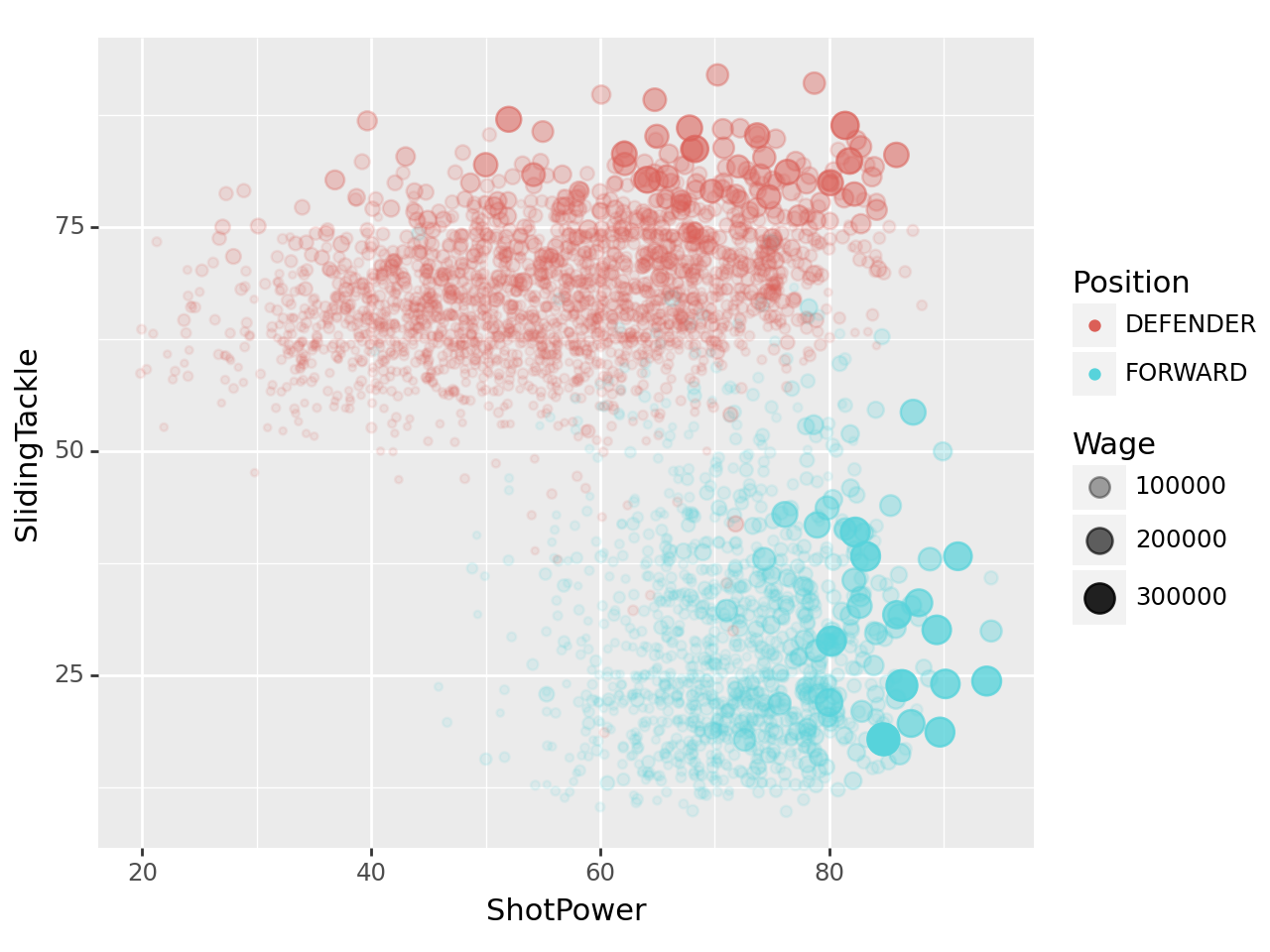
해치웠나…?
결론
- 데이터의 결측치를 반드시 먼저 처리하고 하자!(dropna()의 필요성)
- pop()을 사용하기 전에는 결측치를 반드시 모두 없애자!
- 데이터를 가공하여 순서가 바뀐 경우 왠만해선 인덱스를 초기화해주자!(reset_index()의 필요성)